TravelHub Developer Guide
Acknowledgements
- This project is based on the ContactBook-Level3 project created by the SE-EDU initiative.
Setting up, getting started
Refer to the guide Setting up and getting started.
Design
Architecture
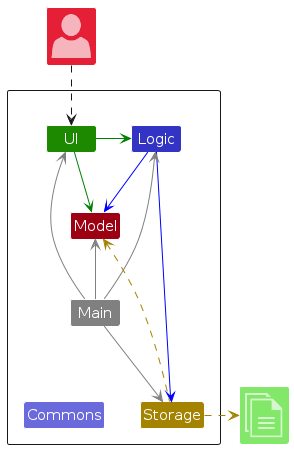
The Architecture Diagram given above explains the high-level design of the App.
Given below is a quick overview of main components and how they interact with each other.
Main components of the architecture
Main (consisting of classes Main and MainApp) is in charge of the app launch and shut down.
- At app launch, it initializes the other components in the correct sequence, and connects them up with each other.
- At shut down, it shuts down the other components and invokes cleanup methods where necessary.
The bulk of the app's work is done by the following four components:
UI: The UI of the App.Logic: The command executor.Model: Holds the data of the App in memory.Storage: Reads data from, and writes data to, the hard disk.
Commons represents a collection of classes used by multiple other components.
How the architecture components interact with each other
The Sequence Diagram below shows how the components interact with each other for the scenario where the user issues the command deleteContact 1.
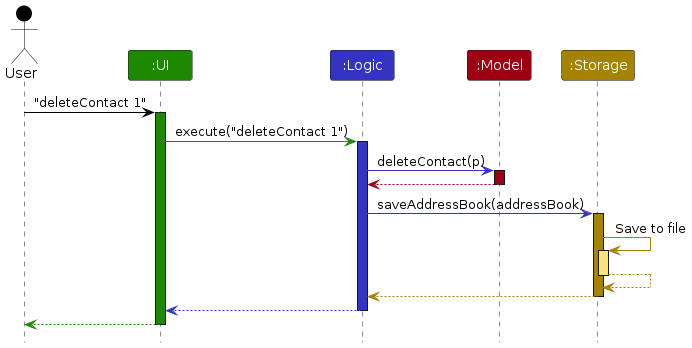
Each of the four main components (also shown in the diagram above),
- defines its API in an
interfacewith the same name as the Component. - implements its functionality using a concrete
{Component Name}Managerclass (which follows the corresponding APIinterfacementioned in the previous point.
For example, the Logic component defines its API in the Logic.java interface and implements its functionality using the LogicManager.java class which follows the Logic interface. Other components interact with a given component through its interface rather than the concrete class (reason: to prevent outside component's being coupled to the implementation of a component), as illustrated in the (partial) class diagram below.
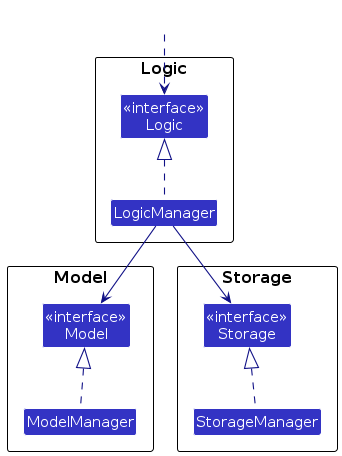
The sections below give more details of each component.
UI component
The API of this component is specified in Ui.java
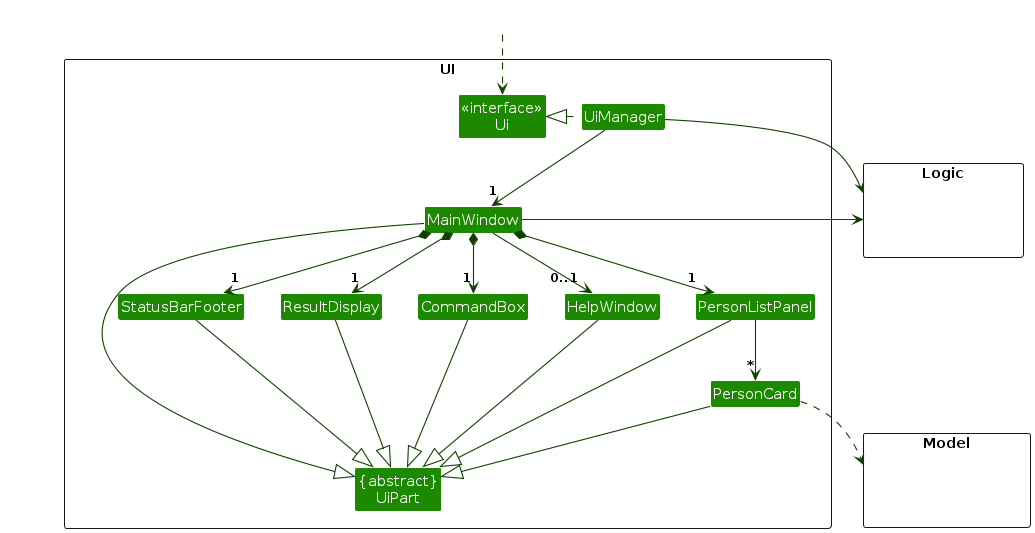
The UI consists of a MainWindow that is made up of parts e.g.CommandBox, ResultDisplay, ContactListPanel, StatusBarFooter etc. All these, including the MainWindow, inherit from the abstract UiPart class which captures the commonalities between classes that represent parts of the visible GUI.
The UI component uses the JavaFx UI framework. The layout of these UI parts are defined in matching .fxml files that are in the src/main/resources/view folder. For example, the layout of the MainWindow is specified in MainWindow.fxml
The UI component,
- executes user commands using the
Logiccomponent. - listens for changes to
Modeldata so that the UI can be updated with the modified data. - keeps a reference to the
Logiccomponent, because theUIrelies on theLogicto execute commands. - depends on some classes in the
Modelcomponent, as it displaysContactobject residing in theModel.
Logic component
API : Logic.java
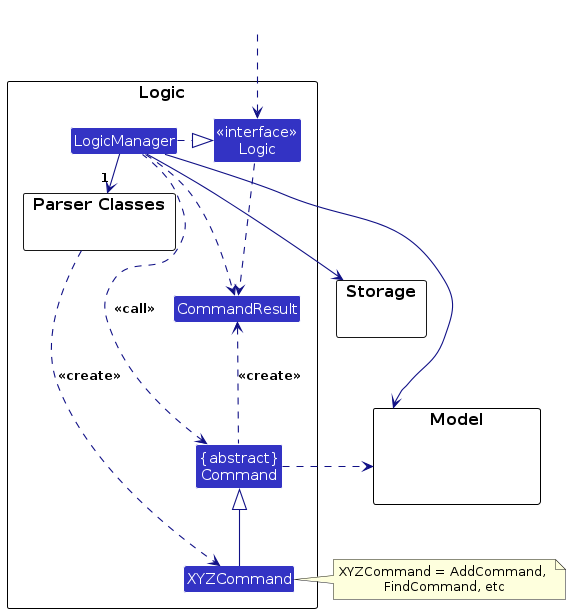
Here's a (partial) class diagram of the Logic component:
The sequence diagram below illustrates the interactions within the Logic component, taking execute("deleteContact 1") API call as an example.
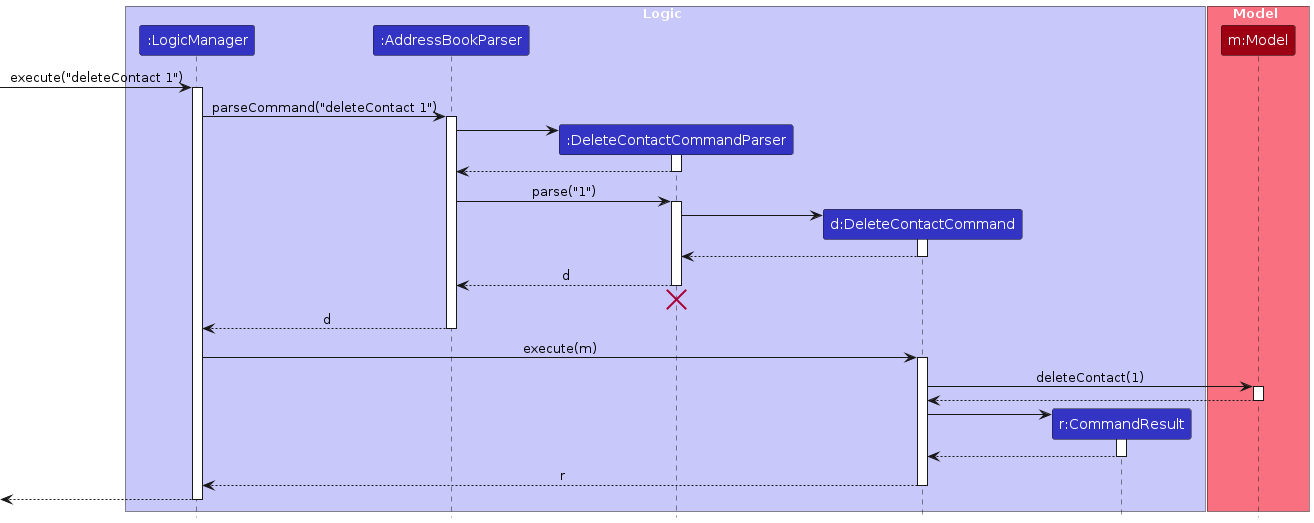
Note: The lifeline for DeleteContactCommandParser should end at the destroy marker (X) but due to a limitation of PlantUML, the lifeline continues till the end of diagram.
How the Logic component works:
- When
Logicis called upon to execute a command, it is passed to anContactBookParserobject which in turn creates a parser that matches the command (e.g.,DeleteContactCommandParser) and uses it to parse the command. - This results in a
Commandobject (more precisely, an object of one of its subclasses e.g.,DeleteContactCommand) which is executed by theLogicManager. - The command can communicate with the
Modelwhen it is executed (e.g. to delete a contact).
Note that although this is shown as a single step in the diagram above (for simplicity), in the code it can take several interactions (between the command object and theModel) to achieve. - The result of the command execution is encapsulated as a
CommandResultobject which is returned back fromLogic.
Here are the other classes in Logic (omitted from the class diagram above) that are used for parsing a user command:
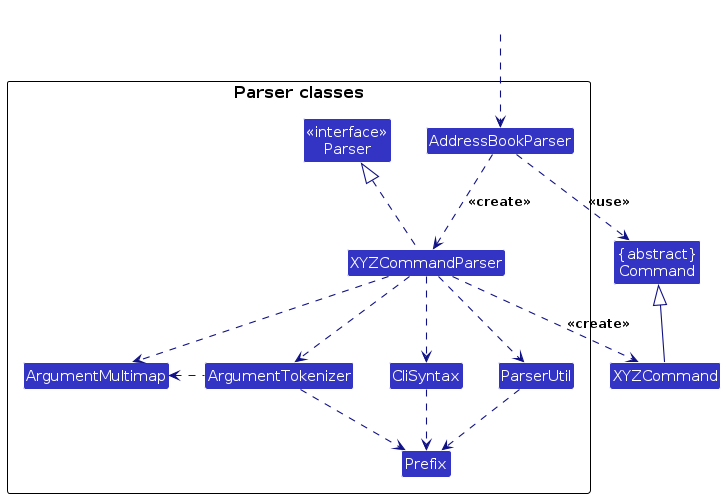
How the parsing works:
- When called upon to parse a user command, the
ContactBookParserclass creates anXYZCommandParser(XYZis a placeholder for the specific command name e.g.,AddContactCommandParser) which uses the other classes shown above to parse the user command and create aXYZCommandobject (e.g.,AddContactCommand) which theContactBookParserreturns back as aCommandobject. - All
XYZCommandParserclasses (e.g.,AddContactCommandParser,DeleteContactCommandParser, ...) inherit from theParserinterface so that they can be treated similarly where possible e.g, during testing.
Model component
API : Model.java
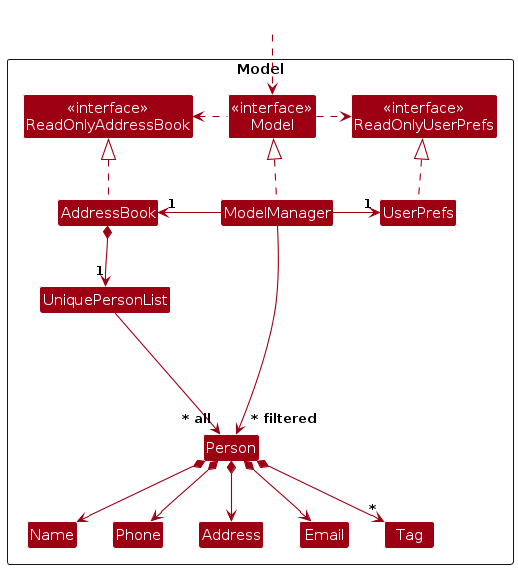
The Model component,
- stores the contact book data i.e., all
Contactobjects (which are contained in aUniqueContactListobject). - stores the currently 'selected'
Contactobjects (e.g., results of a search query) as a separate filtered list which is exposed to outsiders as an unmodifiableObservableList<Contact>that can be 'observed' e.g. the UI can be bound to this list so that the UI automatically updates when the data in the list change. - stores a
UserPrefobject that represents the user's preferences. This is exposed to the outside as aReadOnlyUserPrefobjects. - does not depend on any of the other three components (as the
Modelrepresents data entities of the domain, they should make sense on their own without depending on other components)
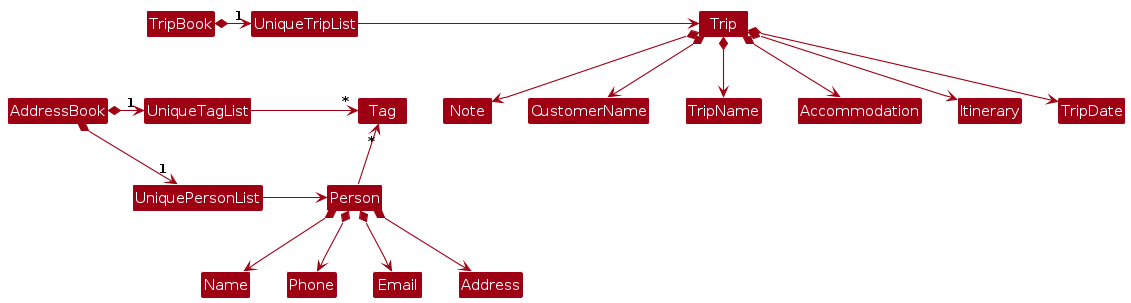
Note: An alternative (arguably, a more OOP) model is given below. It has a Tag list in the ContactBook, which Contact references. This allows ContactBook to only require one Tag object per unique tag, instead of each Contact needing their own Tag objects.
Storage component
API : Storage.java
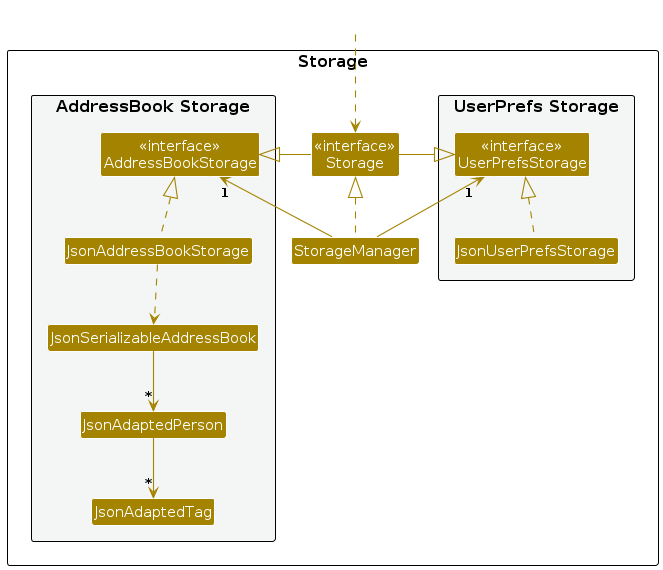
The Storage component,
- can save both address book data and user preference data in JSON format, and read them back into corresponding objects.
- inherits from both
ContactBookStorageandUserPrefStorage, which means it can be treated as either one (if only the functionality of only one is needed). - depends on some classes in the
Modelcomponent (because theStoragecomponent's job is to save/retrieve objects that belong to theModel)
Common classes
Classes used by multiple components are in the seedu.address.commons package.
Implementation
This section describes some noteworthy details on how certain features are implemented.
Trip Management System
The Trip management system allows travel agents to create, edit, delete, and list trips, which are essential for organizing travel plans for customers. Below are the details of its implementation.
Trip and Contact Relationship
In the current implementation, there is intentionally no direct relationship between Trip and Contact entities. This design decision was made to provide:
- Flexibility: Allows trips to be created without requiring contacts to exist in the system first
- Simplicity: Reduces implementation complexity by avoiding dependencies between data models
- Independent Management: Enables users to manage trips and contacts independently
This approach supports the current use case where a travel agent might quickly create a trip record with customer names before fully registering those customers as contacts in the system.
Notes Parameter Behavior
Both Contact and Trip entities support notes through the nts/ parameter prefix. When parsing commands like addContact, editContact, addTrip, and editTrip, developers should be aware of the following important behavior:
- If any parameter prefixes that is used in either Contact or Trip (e.g.,
n/,p/,e/,a/,t/,acc/,i/,d/,c/) appear within the note content, they will be interpreted as separate parameters rather than part of the note text. - For example, in a command like
addTrip n/Europe Trip acc/Grand Hotel i/Sightseeing d/1/6/2024 nts/Remember to book n/train tickets, the text "n/train tickets" would not be part of the note - instead, "n/train tickets" would be treated as a separate name parameter. - This behavior is by design and is consistent across all commands that accept the note parameter.
Adding a Trip to the Trip Book
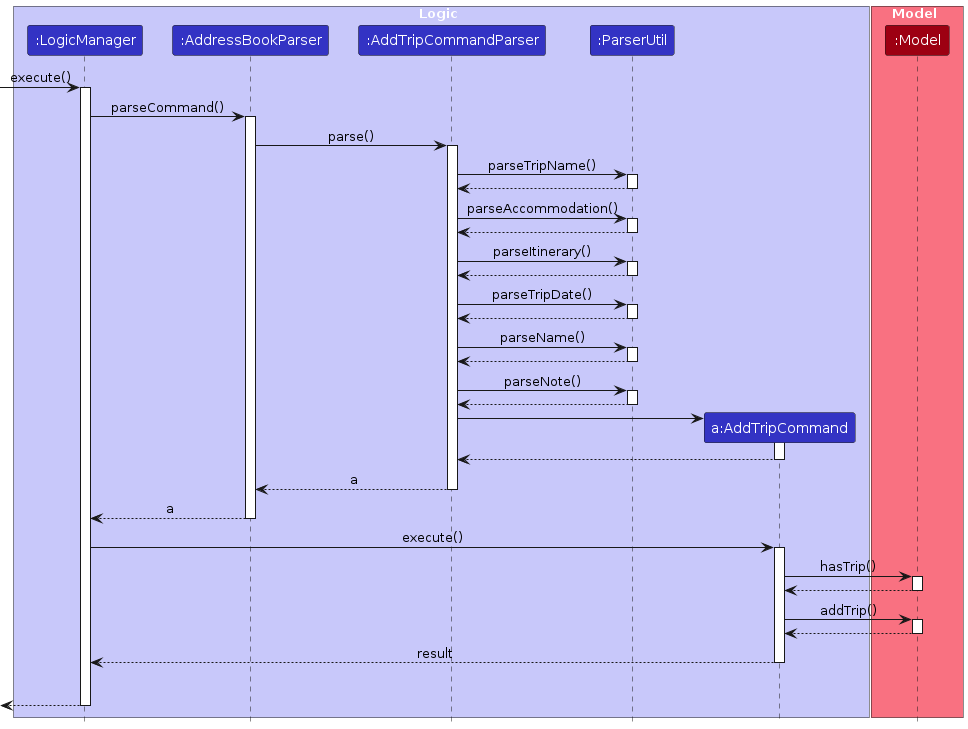
The implementation follows these steps:
AddressBookParseridentifies that the command type isaddTripbased on the command word and creates an instance ofAddTripCommandParserto parse the user input.AddTripCommandParserextracts values corresponding to the required prefixes:- The name prefix
n/must contain a non-empty trip name. - The accommodation prefix
a/must contain a non-empty accommodation. - The itinerary prefix
i/must contain a non-empty itinerary. - The date prefix
d/must contain a valid trip date in the format d/M/YYYY. - The customer name prefix
cn/is optional and can be specified multiple times. - The note prefix
note/is optional and contains additional information about the trip. kj
- The name prefix
If any of the required prefixes are missing or invalid,
AddTripCommandParserthrows aParseException. Otherwise, it creates a new instance ofAddTripCommandbased on the parsed input.When executed,
AddTripCommand:- Checks if the trip already exists in the model by name (case-insensitive)
- If it's a duplicate, throws a
CommandException - Otherwise, adds the trip to the trip book via the model
NOTE: TravelHub identifies a trip as duplicate if their trip names match (case-insensitive) with an existing trip in the trip book.
Deleting a Trip from the Trip Book
The delete trip feature allows users to remove trips from the trip book by specifying the trip's index in the displayed list.
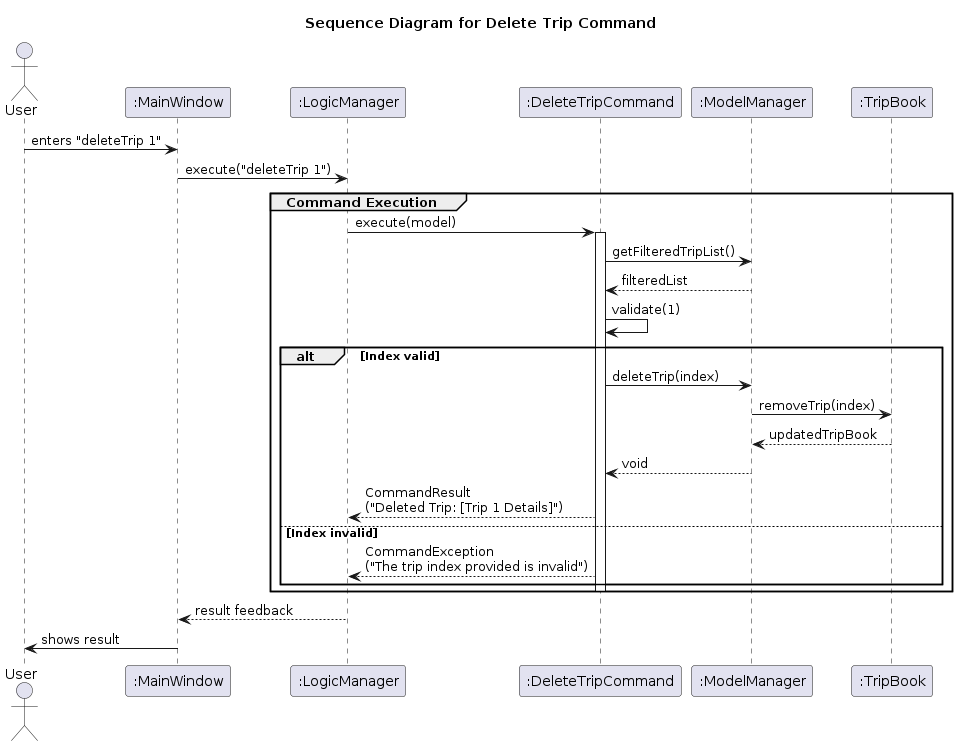
AddressBookParseridentifies that the command type isdeleteTripbased on the command word and creates an instance ofDeleteTripCommandParserto parse the user input.DeleteTripCommandParserextracts the index from the command arguments and ensures:- The Index is a valid positive integer.
If the index is invalid,
DeleteTripCommandParserthrows aParseException. Otherwise, it creates a new instance ofDeleteTripCommandbased on the user input.Upon execution,
DeleteTripCommand:- Checks if the index is within the bounds of the filtered trip list
- If the index is invalid, throws a
CommandException - Retrieves the trip to be deleted from the filtered trip list
- Calls
model.deleteTrip(tripToDelete)to remove the trip from the trip book - Returns a
CommandResultwith a success message
Editing a Trip's Details
The edit trip feature allows users to modify the details of an existing trip by specifying the trip's index in the displayed list and the new details.
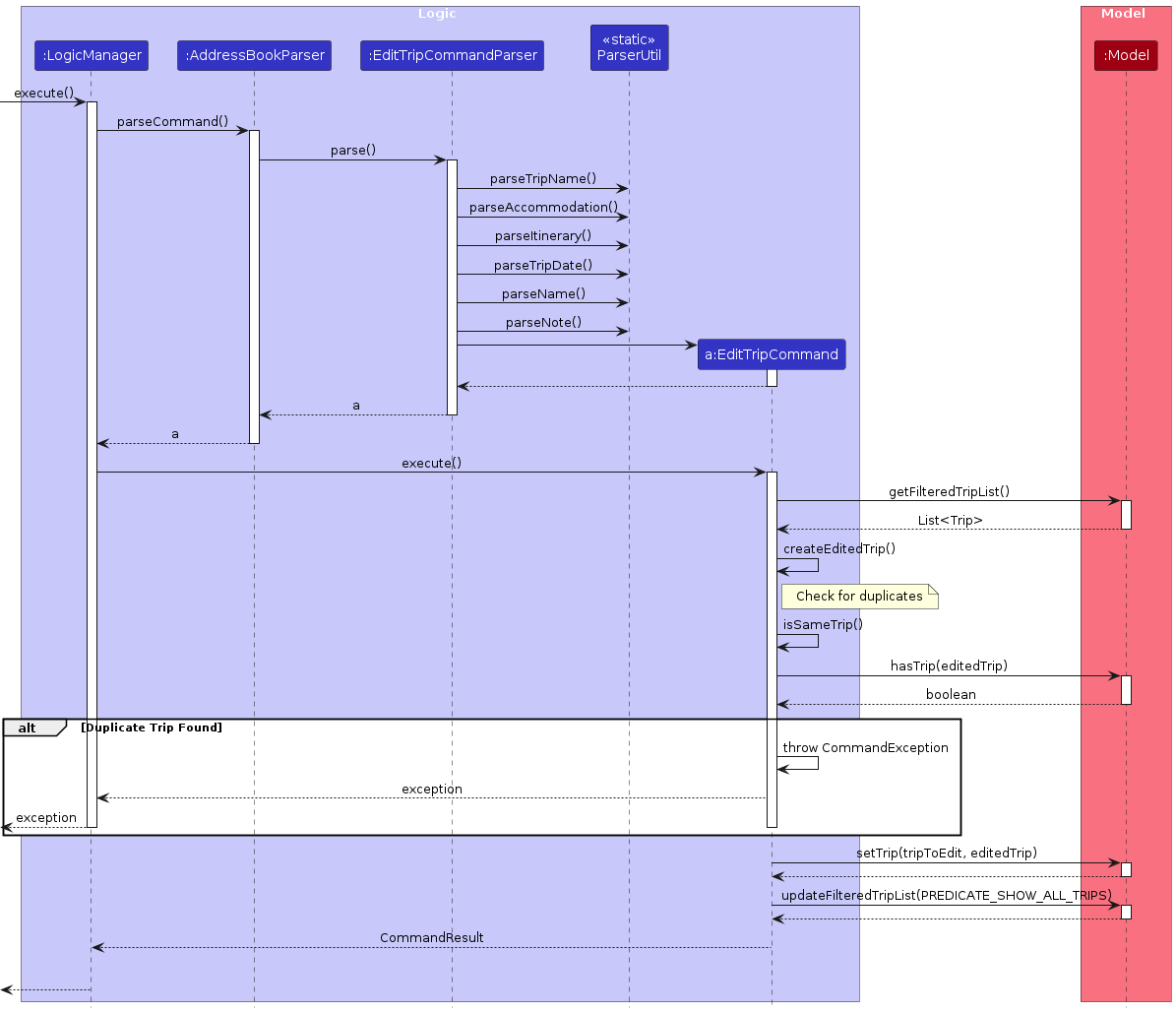
AddressBookParseridentifies that the command type iseditTripbased on the command word and creates an instance ofEditTripCommandParserto parse the user input.EditTripCommandParserextracts the index and provided fields from the command arguments and ensures:- The Index is a valid positive integer.
- At least one field is provided for editing.
If the input is invalid,
EditTripCommandParserthrows aParseException. Otherwise, it creates a new instance ofEditTripCommandbased on the user input.Upon execution,
EditTripCommand:- Checks if the index is within the bounds of the filtered trip list
- If the index is invalid, throws a
CommandException - Retrieves the trip to be modified from the list
- Creates a new
Tripinstance with the updated details - Checks for duplicate trip entries in the system and throws a
CommandExceptionif a duplicate is found - Updates the model with the modified trip information
- Returns a
CommandResultconfirming the successful edit
Listing Trips
The list trip feature allows users to view all trips or filter trips by date.
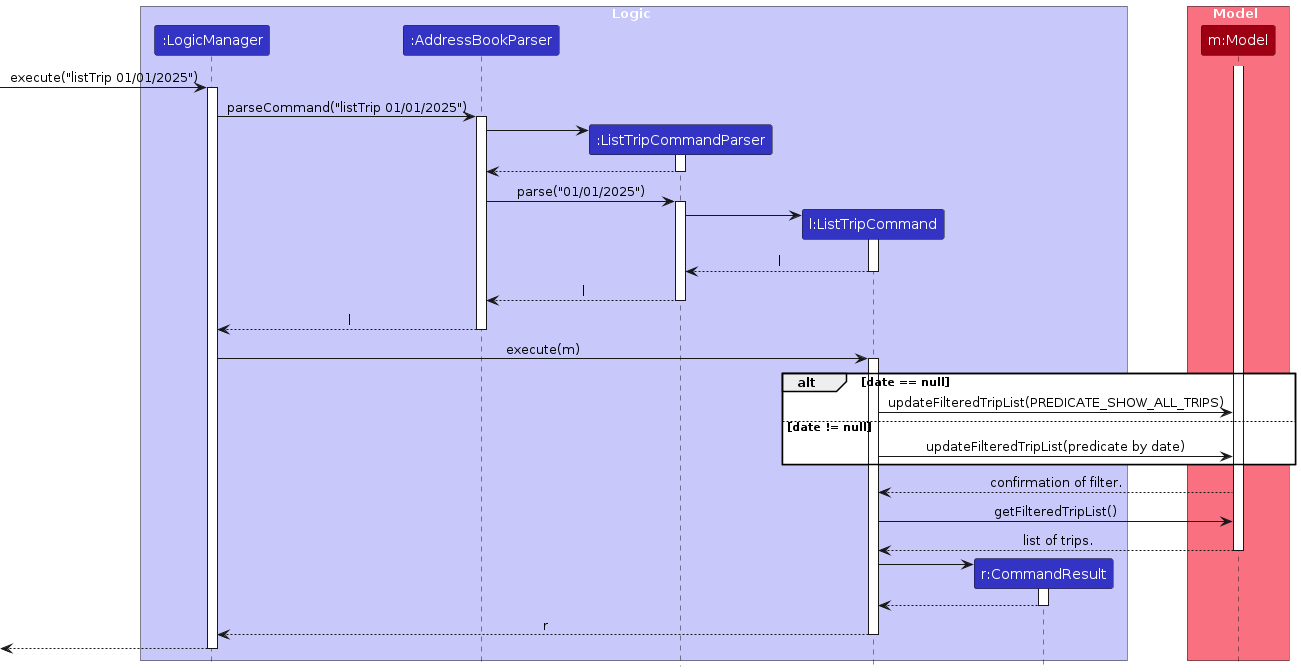
AddressBookParseridentifies that the command type islistTripbased on the command word and creates an instance ofListTripCommandParserto parse the user input.ListTripCommandParserchecks if additional arguments are provided:- If no arguments are provided, it creates a
ListTripCommandthat will show all trips - If a date argument is provided, it parses the date and creates a
ListTripCommandwith the filter date
- If no arguments are provided, it creates a
Upon execution,
ListTripCommand:- If no filter date is specified, updates the model to show all trips
- If a filter date is specified, updates the model to show only trips on that date
- Returns a
CommandResultindicating the trips are listed
Trip Storage System
Trips are stored in a JSON format similar to contacts. The TripBook class maintains a list of trips in an UniqueTripList, which ensures that there are no duplicate trips. The Storage component handles saving and loading of trips from disk.
Each Trip object contains:
- A mandatory
TripNamethat uniquely identifies the trip - A mandatory
Accommodationspecifying where customers will stay - A mandatory
Itinerarydescribing the planned activities - A mandatory
TripDatein the format d/M/YYYY - An optional set of customer names associated with the trip
- An optional
Notecontaining additional information about the trip
All trip data is automatically saved when changes are made and loaded when the application starts.
Documentation, logging, testing, configuration, dev-ops
Appendix: Requirements
Product scope
Target User Profile:
- Travel agents who struggle with problem 1: managing a fragmented workflow involving multiple clients and service providers across various platforms.
- Travel agents who face problem 2: difficulty in rapidly accessing and organizing detailed client preferences and trip specifics, especially during time-sensitive client calls.
Value Proposition:
TravelHub addresses these challenges by providing:
- Solution to problem 1: A centralized application that streamlines the travel planning workflow, consolidating client and service provider management, trip organization, and note-keeping into a single, efficient system.
- Solution to problem 2: Tools for rapid client information retrieval, detailed preference tracking through a flexible notes system, and chronological trip management, enabling quick and informed responses during client consultations.
Scope boundaries:
- Focuses on contact and trip management, not financial transactions or booking confirmations
- Designed for individual travel agents or small agencies (not enterprise-scale operations)
- Optimized for managing up to several hundred contacts and trips
- Not intended for end-client usage or self-service booking
- Will not generate travel documents or automatically communicate with service providers
User stories
Priorities: High (must have) - * * *, Medium (nice to have) - * *, Low (unlikely to have) - *
| Priority | As a … | I want to … | So that I can… |
|---|---|---|---|
* * * | travel agent | add contacts along with comprehensive details | profile and contact them |
* * * | travel agent | delete contacts | remove invalid or non-existent contacts |
* * * | travel agent | add trips with information like dates, customers, accommodation and itineraries | check all the consolidated information for a trip |
* * * | travel agent | delete trips | remove outdated or irrelevant information |
* * * | travel agent | tag contacts | know whether they are a customer or service |
* * * | travel agent | add notes to customer profiles or trips | keep track of special requests or important details |
* * | travel agent | update contact information | keep up-to-date information when their details change |
* * | travel agent | update trip information | keep up-to-date information when trip details change |
* * | travel agent | search for specific contacts | quickly locate the information I need |
* * | travel agent | change the date of the trip | accommodate flexibility in plans |
* * | travel agent | refer to all possible commands | refer to instructions when I forget how to use the app |
* * | travel agent | view the list of trips for a specific date | get information in a accesible and organised manner |
* | potential travel agent | see the app populated with sample customer profiles and trips | understand how the data is organized and what I can achieve with the system |
* | new travel agent | clear the sample data with a single command | start with a clean slate for my customer data and trip records |
* | long-time travel agent | remove completed trips and inactive customer profiles | keep my workspace uncluttered and focused on current travel plans |
* | clumsy travel agent | change my previous actions | correct my mistakes |
* | travel agent | view my customers by their tags | easily compare contacts of the same tag with one another |
Use cases
(For all use cases below, the System is the TravelHub and the Actor is the Travel Agent, unless specified otherwise)
Use case: See Usage Instructions
MSS
Travel Agent requests to see usage instructions.
System displays a list of available commands and their formats.
Travel Agent reads the instructions.
Use case ends.
Extensions
- 2a. The system fails to load the instructions.
- 2a1. System displays an error message: "Unable to load usage instructions. Please try again later."
- 2a2. Use case ends.
- 1a. Travel Agent includes additional text after the help command (e.g., "help xyz").
- 1a1. System ignores the additional text and processes the command as "help".
- 1a2. Use case continues at step 2.
Use case: Add a Contact
MSS
Travel Agent requests to add a new contact with details (name, phone number, email, address, tag and notes).
System validates the contact details.
System adds the contact to the contact list.
System displays a success message for adding the contact.
Use case ends.
Extensions
- 2a. The contact details are entered in an invalid format
- 2a1. System displays an error message stating the add contact format is invalid.
- 2a2. Use case resumes at step 1.
- 2b. The contact already exists in the system (same email).
- 2b1. System displays an error message that the email is already in use.
- 2b2. Use case ends.
- 2c. The email entered is invalid (i.e. email does not follow the required standard).
- 2c1. System displays an error message on the right email format.
- 2c2. Use case resumes at step 1.
Use case: Add a Trip
MSS
Travel Agent requests to add a new trip with details (trip name, accommodation, itinerary, date, customer names and notes).
System validates the trip details.
System adds the trip to the trip list.
System displays a success message for adding the trip.
Use case ends.
Extensions
- 2a. The trip details are invalid (e.g., invalid date format or customer index).
- 2a1. System displays an error message that the add trip format is invalid.
- 2a2. Use case resumes at step 1.
- 2b. The trip already exists in the system (same trip name).
- 2b1. System displays an error message.
- 2b2. Use case ends.
Use case: Delete a Contact
MSS
Travel Agent requests to delete a specific contact by index.
System deletes the contact.
System displays a success message for deleting the contact.
Use case ends.
Extensions
- 1a. The given index is invalid.
- 1a1. System displays an error message that the index is invalid.
- 1a2. Use case resumes at step 2.
Use case: Delete a Trip
MSS
Travel Agent requests to delete a specific trip by index.
System deletes the trip.
System displays a success message for deleting the trip.
Use case ends.
Extensions
- 1a. The given index is invalid.
- 1a1. System displays an error message that the index is invalid.
- 1a2. Use case resumes at step 2.
Use case: Edit a Contact
MSS
Travel Agent requests to list all contacts.
TravelHub shows a list of contacts.
Travel Agent requests to edit a specific contact via an index.
System validates the index and new contact details.
System updates the contact with the new details.
System displays a success message for editing the contact.
Use case ends.
Extensions
- 2a. The contact list is empty.
- 2a1. System displays a message that there are no contacts in the addressbook.
- Use case ends.
- 3a. The index provided is invalid.
- 3a1. System displays an error message that the index provided is invalid.
- Use case resumes at step 2.
- 3b. Input argument(s) provided are invalid.
- 3b1. System displays an error messasage for the invalid argument(s).
- Use case resumes at step 2.
- 3c. The contact is a duplicate (same email).
- 3c1. System displays an error message that the email already exists in the addressbook.
- Use case resumes at step 2.
Use case: Edit a Trip
MSS
Travel Agent requests to list all trips.
TravelHub shows a list of trips.
Travel Agent requests to edit a specific trip via an index.
System validates the index and new trip details.
System updates the trip with the new details.
System displays a success message for editing the trip.
Use case ends.
Extensions
- 2a. The trip list is empty.
- 2a1. System displays a message that there are no trips found.
- Use case ends.
- 3a. The index provided is invalid.
- 3a1. System displays an error message that the index provided is invalid.
- Use case resumes at step 2.
- 3b. Input argument(s) provided are invalid.
- 3b1. System displays an error messasage for the invalid argument(s).
- Use case resumes at step 2.
- 3c. The trip is a duplicate (same name).
- 3c1. System displays an error message that the trip name already exists in the tripbook.
- Use case resumes at step 2.
Use case: Find a Contact
MSS
Travel Agent find for contacts using a keyword.
System searches for matching contacts and trips.
System displays a list of matching results.
Use case ends.
Use case: Clear All Data
MSS
Travel Agent enters the clear command to remove all contacts and trips.
System displays a confirmation pop-up asking if the user really wants to clear all data.
Travel Agent confirms by clicking "Yes".
System clears all contact and trip data from the application.
System displays a success message: "Address book and trip book have been cleared!"
Use case ends.
Extensions
- 3a. Travel Agent cancels the operation by clicking "No".
- 3a1. System does not clear any data.
- 3a2. System returns to the previous state.
- 3a3. Use case ends.
- 1a. Travel Agent includes additional text after the clear command (e.g., "clear xyz").
- 1a1. System ignores the additional text and processes the command as "clear".
- 1a2. Use case continues at step 2.
Non-Functional Requirements
- Compatability: Should work on any Mainstream OS as long as it has Java
17or above installed. - Performance: Should be able to hold up to 1000 contacts and trips without a noticeable sluggishness in performance for typical usage.
- Performance: Should respond within three seconds for any command executed.
- Usability: A typists with at least 70 WPM for regular text can enter the commands faster than by using a mouse.
- Usability: A user with basic understanding of the english language can utilise this application.
- Reliability: The application should automatically save all contact and trip data after each operation to prevent data loss.
- Data Security: All travel agent and customer data must remain on the local machine and not be transmitted to external services.
- Maintainability: All code must adhere to the coding standard to ensure readability and facilitate future scalability.
Glossary
This section defines key terms used in the user guide to ensure clarity and understanding.
| Term | Definition |
|---|---|
| CLI | Command Line Interface. A text-based interface where users interact with the application by typing commands. |
| GUI | Graphical User Interface. A visual interface where users interact with the application through graphical elements like buttons and menus. |
| Mainstream OS | Operating systems that are widely used, such as Windows, Linux, Unix, and macOS. |
| JSON | JavaScript Object Notation. A lightweight data format used for storing and transferring data in a human-readable format. |
| API | Application Programming Interface. A set of rules and protocols that allow different software components to communicate with each other. |
| OOP | Object-Oriented Programming. A programming paradigm based on the concept of "objects," which can contain data and code to manipulate that data. |
| Model | A component in the application that manages the data and business logic. |
| UI | User Interface. The part of the application that users interact with, including screens, buttons, and other visual elements. |
| Storage | A component in the application responsible for saving and retrieving data, such as contact information and user preferences. |
| Command | An instruction given by the user to the application to perform a specific action, such as adding or deleting a contact. |
| Parser | A component that interprets user input and converts it into commands that the application can execute. |
| ObservableList | A list that allows external components to observe changes to its contents, typically used in the UI to automatically update when data changes. |
| UserPref | User Preferences. Settings or configurations that the user can customize, such as the application's appearance or behavior. |
| Customer Contact | A contact tagged as "customer," representing an individual who is a client of the travel agency. |
| Service Contact | A contact tagged as "service," representing a business or service provider (e.g., hotels, resorts, restaurants and attractions). |
| Trip | A planned journey or vacation, including details such as trip name, start date, customers, accommodation, itineraries and notes |
| Note | Additional information or details added to a customer profile or trip, such as special requests or important reminders. |
Planned Enhancement
Trip and Contact Relationship Implementation
Currently, there is no relationship between Trip and Contact entities. In future iterations, we plan to implement a proper relationship between these entities to enhance data integrity and enable more powerful features.
Proposed Implementation:
- Add a relationship between Trip and Contact entities where trips reference actual Contact objects instead of just customer names
- Implement validation to ensure customer references in trips point to existing contacts
- Add UI elements to easily select contacts when creating or editing trips
- Create a bidirectional relationship allowing users to see all trips associated with a contact
Benefits:
- Improves data integrity by ensuring trips only reference valid contacts
- Enables powerful queries such as "show all trips for a specific contact"
- Provides better tracking of customer trip history
- Facilitates trip planning by leveraging existing contact information
Implementation Challenges:
- Need to handle migration of existing trips that only store customer names
- Must address UI complexity for selecting multiple contacts from a list
- Should consider backward compatibility for older data formats
- Need to handle deletion scenarios (e.g., what happens to trips when a referenced contact is deleted)
Escape Character for Notes
Currently, if parameter prefixes (e.g., n/, p/, e/, a/, t/, acc/, i/, d/, c/) appear within note content, they are treated as separate parameters rather than as part of the note. To allow users to include these prefix patterns in their notes, we plan to implement an escape character mechanism.
Proposed Implementation:
- Introduce a special escape character (e.g., backslash
\) that users can place before parameter prefixes in notes - For example,
nts/Remember to call \p/12345678would include "p/12345678" as part of the note text - The parser will detect the escape character and interpret the following prefix as literal text rather than a parameter marker
Benefits:
- Users can include parameter-like text in their notes without causing unexpected parsing behavior
- Improves flexibility in note content without compromising the existing command structure
- Maintains backward compatibility with existing commands
Implementation Challenges:
- Need to modify the parser to recognize and handle the escape character
- Must ensure proper handling of edge cases, such as multiple consecutive escape characters
Add End Date for Trips
Currently, trips only have a start date. To better support trip planning and tracking, we plan to enhance the Trip model to include an end date.
Proposed Implementation:
- Add a new
TripEndDateclass similar to the existingTripDateclass - Extend the Trip model to include an end date field
- Update relevant parsers to accept an end date parameter (e.g.,
ed/5/6/2024) - Modify the trip display to show both start and end dates
- Update storage to persist the end date information
Benefits:
- Allows users to track the full duration of trips
- Enables future enhancements such as trip duration calculations and trip overlap detection
- Provides more complete trip information at a glance
Implementation Challenges:
- Need to ensure the end date is not earlier than the start date
- Must update existing trip displays and storage format while maintaining backward compatibility
- Should modify trip filtering to consider both start and end dates
Make Commands Case-Insensitive
Currently, all commands must be entered in exact camelCase format (e.g., addTrip, editContact, help), which can be error-prone for users. Typing ADDTRIP or Addtrip or addtrip, which hurts usability—especially for new users or CLI users accustomed to case-insensitive input.
Proposed Implementation:
- In the main AddressBook Parser, normalise only the command word to lower case before matching
- Update all defined command keywords to lowercase for matching
- Convert all
COMMAND_WORDconstants in command classes to lowercase (e.g.,COMMAND_WORD = "addtrip";) - Keep displaying commands in camelCase (e.g., in help messages) for readability
- Update unit tests for various case combinations (i.e.
addtrip,AddTrip,ADDTRIP,AdDtRiP— all should work)
Benefits:
- Allows better usability as users can type commands without worrying about case.
- Reduces frustration from subtle casing issues.
- Makes the CLI interface more forgiving and beginner-friendly.
Implementation Challenges:
- Must ensure only the command word is normalized—arguments (e.g., names, places, tags) must remain case-sensitive to preserve user data fidelity.
- All command recognition logic must adapt to use lowercased comparisons without affecting internal casing conventions elsewhere.
Appendix: Instructions for manual testing
Given below are instructions to test the app manually.
Note: These instructions only provide a starting point for testers to work on; testers are expected to do more exploratory testing.
Launch and shutdown
Initial launch
Download the jar file and copy into an empty folder
Double-click the jar file Expected: Shows the GUI with a set of sample contacts. The window size may not be optimum.
Saving window preferences
Resize the window to an optimum size. Move the window to a different location. Close the window.
Re-launch the app by double-clicking the jar file.
Expected: The most recent window size and location is retained.
Deleting a contact
Deleting a contact while all contacts are being shown
Prerequisites: List all contacts using the
listContactcommand. Multiple contacts in the list.Test case:
deleteContact 1
Expected: First contact is deleted from the list. Command Output Box displays the details of the deleted contact.Test case:
deleteContact 0
Expected: No contact is deleted. Error message shown: The contact index provided is invalid.Other incorrect delete commands to try:
deleteContact,deleteContact x,...(where x is larger than the list size)
Expected: Similar to previous.
Saving data
Simulating a corrupted data file
- Prerequisites: Have at least 1 contact in the addressbook.
- Navigate to the folder which contains the
TravelHub.jarfile. - Navigate into the
data/folder and open theaddressbook.jsonfile. - Append any letter to the end of the value in the phone field, e.g.,
"phone" : "98765432Z", - Start up the appplication.
Expected: Application starts up with an empty address book.